Header

Mrs. King at Home About Mrs. King Contact Mrs. King Mrs. King's Music Class HOME Image Map
Showing posts with label STEAM. Show all posts

99 Music Workstations You are Going to Love


A HUGE list of Music Workstations for the elementary music classroom.  You are going to love these center ideas for pitch, rhythm, singing, composing, playing instruments and more.

I love using workstations in my classroom.  I wanted to share a list of some of my favorites, but I think I got a little carried away.  Here are almost 100 workstations that I love with links and explanations.  Enjoy!

Coloring

Color by Note  These activities are fun for students an allow them to show what they know by coloring their answers.  Some of these activities may take more than 10 minutes.
Writing Prompts   Perfect for workstations!  Students write an answer, a paragraph or a story based on the prompts.  Use regular paper or Chrome books and Google Classroom!
Composer Coloring Sheets  Although I often use these while listening to music, they work great in a workstation.  Even the big kids enjoy this!
Primary Writing Prompts   Younger students that may be pre-readers, need to be able to express their ideas with words and pictures.  These primary writing prompts provide space for both.
My Book of Mary Poppins. As a review after we have watched the movie (or portions of it), we color these books that highlight some key items in the movie.
Instrument Coloring Sheet This is probably pretty obvious.  Coloring sheets for instruments or for groups of instruments in their families are great for workstations.
Music Memory Book This is best when used at the end of the school year.  I usually have students work on the books for about half of a class period.  Next class, they finish them as one of the stations that I have set up.
Roll and Cover worksheets  Easy peasy.  Print and set in a workstation with some crayons and some dice.  Actually I use one BIG die and the group shares.  Fun!


Composing

I find that it is really difficult to complete a composing project in the small amount of time that students have in a workstation.  So, instead of doing an entire project, these centers allow students to compose by arranging.  Take a closer look:


Dynamics and Tempo

Candy Corn -Dynamics  This seasonal workstation is simple to do.  Students complete a candy corn puzzle that contains a dynamic term, symbol and definition.  Then, they copy that information to a chart.
A Dab of Music Learning - Dynamics and Symbols  I love dabbers and so do my students!  The set focuses on dynamics and music symbols.  I usually plan 2-3 worksheets for one center.
Dynamics Punch Cards  I have quite a few hand held hole punchers and they come in handy for this station!  Take a closer look by clicking on the link.


Instrument Families

A Dab of Music Learning- Instruments   Another dabber activity set.  This set focuses on instrument families and provides many opportunities for students to show what they know.
Instrument Matching Game  Use pictures of instruments or print this set to use to have students match pictures of instruments with the names of instruments.
Mystery Instruments  One of my favorite activities. I tell students to be sneaky detectives and not tell any other groups what instrument they think is the mystery instrument.  They fill out a "case file" that records the clues they discover. At the one of the center rotations I open the bag and show the class.  Using a different instrument, you could do this many times.
Clip It-Instruments Edition   Just add clothespins to these cards for an engaging workstation that reinforces instrument names and simple rhythm patterns.
Read It, Trace It, Stamp It  This station requires some letter stamps and an ink pad.  Get the washable kind of ink pads.  Trust me.
Dip Tray Family Sort  Using an inexpensive dip tray from the dollar store, this station is a breeze to set up.  Read more about it.
Instrument Coloring Sheets  Use these to reinforce your unit on instrument families.
Instrument Family Punch Cards  Which of these instruments is in the brass family?  Punch your answers with a hole puncher.  Fun assessment.
My Book of Instruments  These take a little bit of time to copy and assemble but are great for small group work or workstations.  Do one family at a time or all instruments at the same time.
Instrument Investigations  This activity takes 15- 20 minutes so you may need to plan a day of longer workstations to make this go well.
Misspelled Instrument Punch Cards  I think it is important that students learn to spell instrument names correctly.  I don't always feel like I have enough time during instruction, so I love adding these punch cards to a workstation rotation.


Movement

Yes!  You can do a movement center!  Set clear expectations and add music (or not) and these activities work so great in stations.  Student love them too.


Non-Pitch Percussion Instruments

Playing instruments is one of my students' favorite workstations and I understand why!  These station sets make playing instruments a pleasant and organized experience.  No, really.d


Pitch

A Dab of Music Learning - Intervals  These dabber activities are great for upper grades.
A Dab of Music Learning -Pitches   Drilling pitch names doesn't have to be boring.  These dabber activities are designed to be completed quickly.  That makes them perfect for workstations.  
Treble Clef Twister  There are many ways to do this, but essentially it requires a staff on the floor.  This could be one that you create with tape, one you already have on a rug or one that you draw on a plain shower curtain.  The link will take you to a sheet that I use as a spinner.
Musical Mneumonics  Another way to drill those pitch names is to have students create their own musical mnemonics.  
Bottle Cap Staff   I have collected hundreds of bottle caps from 2-liters of soda, water bottles, etc...  They make perfect note heads.  Take a closer look to see how it could work in a center.
Bottle Cap Pitch Sort  I also took some of those bottle caps and modge-podged some staves and notes on them.  Students sort them into piles based on their letter name.
Flashcards  - Yeah.  They are boring, but neccessary.  It seems that kids hardly ever use them anymore so maybe they will find them to be a novelty.
Worksheets   I know.  It sounds boring, but these worksheets are attractive and easily completed in the time that students have in a workstation.
Swat the Staff  Create a staff on the wall with tape.  Two students stand next to it, another calls out a letter from the musical alphabet.  The first one to swat the correct line or space wins!
Pitch Match Ups  Basically flashcards, but you match words spelled out by notes on the staff to the words.  Lots of fun designs.
Bop It/Simon Says  Melodic retention.  :-)


Reading

I almost always use my reading area as a stop in the workstation rotation.  Here are some links that might help you out with your reading area.
Classroom Library  Need some ideas for your reading area?  Check out this huge list!
Books for Primary Classes  This is a great list of books that your primary classes will love.
Men and Women of Jazz  Print and laminate the pieces of this bulletin board and include them at a workstation.  They contain short passages and students have time to read more than one during their center rotation.
Meet the Composers  Similar to the Men and Women of Jazz, this bulletin board set can become a reading station too.
Magazines - Do you subscribe to Music Alive or Music Express?  Leave a few copies in a crate and set it in the floor.  Instant workstation!


Rhythm

A Dab of Music Learning - Rhythm  Dab.  Dab. Dab dab dab.  Note values, musical math and more in this set.
Drawing Notes-lap packs  This link takes you to a blog post about Lap Packs.  I've used them with Kindergarten through high school.  For the littles, it is a great way to practice drawing notes.
Swat the Rhythm  We like swatting things in my classroom.  The link takes you to a few sets that I have created.  You can do the same activity with flashcards.  Lay them on the floor.  One student claps a rhythm that is on one of the cards.  The first student to swat the right answer, wins a point.  
Rhythm Blocks  Duplos and legos make great music workstations!  Check out this blog post to learn more.
Craft Stick Rhythms - Take craft sticks and use them to make quarter notes and barred eighth notes.  Students clap their "compositions" and then make more.
Roll and Cover  Roll and cover activities allow students to reinforce their knowledge of note names.
Musical Yahtzee  From Layton Music, this activity is great for small groups or workstations.  I laminate the score sheets when using them in workstations and add some music dice.  
Noodle Notes. I love pool noodles!  Learn about how to create noodle notes in this blog post.
Caterpillar Rhythms   Construction paper circles or paper plates become caterpillar bodies in this activity.  Add rhythm patterns or single notes on them and students build a caterpillar pattern.  The longer, the better!
Play Dough Mats  Laminate and just add play dough.  Students learn about notes and symbols through play.
Don't Break the Ice -take a Don't Break the Ice game and draw different notes on each block (quarter, half, barred eighths, 4 16ths, etc....).  Create a spinner with whatever note values you used.  Students spin and the tap out one block with that note on it until somebody breaks the ice.
Add it Up Rhythm Cards  Musical math!  This freebie can be used in many ways.
Note Value Punch Cards  This is another activity for hole punchers that can assess student knowledge.
Rap It Clap It Music Match It  This is an old faithful workstation for me.  Students match the syllables of themed words to simple rhythm patterns.  Perfect for a workstation.  I often do this activity with the whole group and use it in a workstation later.
Clip It Games  Clip it games require students to match words with a rhythm pattern that most closely matches its
Rhythm Pins w/Paint Chips  Cut the paint chips so that there are 4 boxes on them.  Draw single beat notes or rhythms on clothespins.  Students pin a measure on the paint chips, clap and repeat.
Candy Land (note differentiating)  Instead of using Candy Land for just color recognition, add music symbols, notes, pitches, etc... to the colors.  Fun!
Musical Jenga - Check out this awesome idea from the Music K-8 Idea Bank for creating a musical Jenga game.
Tracing Sheets  Get acquainted with notes and their values with these tracing sheets.  Great for younger learners.
Music Math Houses   I laminate these and use dry erase markers.  Students add up all of the musical math problems in colorful houses and check their own answers.
Note Knacks. These are great!  I have one student create a four beat measure and the others recreate it with the Note Knacks.  They are a little pricey, but worth it.
Dot Composing  This is a simplified way to compose using quarter notes, barred eighths or 4 16th notes.  Read more about it in this blog post.
Rhythm Blocks  Kelly Parrish from Rhythmically Yours makes these amazing rhythm blocks.  I use them for rhythmic dictation.  At a workstation, one student secretly creates a rhythm pattern and then claps it for their group.  The other students recreate that with their rhythm blocks.
Poison Rhythms. Using a lap top or table, I have students play poison rhythm just they way we do as a whole group.  FUN!  The link will take you to several different versions.


Vocal Stations

Vocal Explorations  -Vocalizations are a few workstation and let students be a little silly and creative.
Puppets and Books  Use puppets and some Wee Sing books at a station.  The goal?  SING!
Sticky Note Singing   Take a song that you are working to have memorized.  Cover part of it with a sticky note and try singing it.  Add another and try again.  Let your neighbor add the next one and try again.  It is a fun way to work on memorization and to get students singing at their center.
ABC Chart   This one is easy peasy to create.  Check out the blog post for a simple description of this activity.
Singing Sticks from Music Mom  These little singing sticks are great tools to reinforce Solfege or at my school to reinforce the pitch numbers of a major scale.  After using them with classes for a while, they can easily practice in workstation groups to sing patterns.
Singing Rocks   I love my singing rocks!  They really allow for improvisation and creativity.  After I have modeled this activity in class, students are able to do it in a workstation.  It is great to listen to them sing their imaginations out!
Blob Chorus - Ear Training  This is an app that is so fun that students don't realize they are learning!  Hurray!

STEAM

Xyloba   Engineer a marble run that plays a song with this awesome set!
Found Sounds  Collect some junk.  Put it in a box.  Let students become detectives, inventors and musicians.
Stikbot Animation  Animate a dance.  Choreography and green screen technology can create some amazing videos.
Spec Drums  There are so many ways to use Spec Drums in workstations:  exploration, composition, practicing simple folk songs and more!
Ozobots   Code these little robots to show the tempo changes of a piece of music.  Use the workstation time to have them practice creating paths that change speeds (or tempos!).
Makey Makey   My students always fight to be the first group at this station.  I add the instructions, a Makey Makey invention set and some random things for students to experiment with like fruit, play dough, hot dogs...whatever.  Students use these items to play a keyboard or drum on the computer.  I definitely recommend this activity!


Apps

There are SO many great music apps out there.  Here are a few that I think work really well in workstations.


Miscellaneous

Music Interest Inventory Punch Cards   This is a fun addition to workstation rotations at the beginning of the school year.  You can learn a great deal about your students.
Talk About Tunes   I mean, they are going to talk anyway.  Why not make it musical?
Carnival of the Animals  -Use a day of workstations to review Carnival of the Animals.
Peter and the Wolf - This set lets you expand your Peter and the Wolf unit in some fun and creative ways.
Star Spangled Banner   I use this every singing year with 3rd or 4th grade.  It is a great way to learn more about our national anthem, help students memorize it, learn the vocabulary and more.  I always plan a couple of class periods to do all of the stations in this kit.


Whew!  What a list!  If you loved these ideas, PIN THIS for later!
A HUGE list of Music Workstations for the elementary music classroom.  You are going to love these center ideas for pitch, rhythm, singing, composing, playing instruments and more.


 post signature

STEAM in the Music Room: Makey Makey

The Makey Makey is a great invention tool!  Help your students use it in the music room with these music class tested ideas.  STEAM learning can be fun!

I'm a gadget girl.  I have always been a gadget girl.  My heart leaped the first time I saw the Makey Makey in action and I knew I had to give it a try.  Makey Makey is an electronic invention too.  It allows you to connect everyday objects to computer programs.  It uses a small circuit board, alligator clips and a USB cord to connect to your computer and the objects you choose.  Essentially it is creating an electric circuit and sends closed loop electrical signals to the computer.  The computer responds in virtually any app because the Makey Makey uses mouse clicks and key strokes.

The Makey Makey is a great invention tool!  Help your students use it in the music room with these music class tested ideas.  STEAM learning can be fun!

So what, right?  Well did I mention that it can connect to simple percussion and piano apps?  This let's you essentially play the piano on bananas, Play-Dough or even hot dogs.  FUN!  The Makey Makey can allow your students create new "instruments" to play with every day objects.

The Makey Makey is a great invention tool!  Help your students use it in the music room with these music class tested ideas.  STEAM learning can be fun!

The Makey Makey comes with instructions that are ridiculously easy to follow so I won't go into a step by step.  Basically you plug the USB cord into the Makey Makey and your computer.  You connect yourself to earth (which is a section on the circuit board) and then you connect the circuit board to some other object.  You can choose any of the arrow keys, space bar or click.  When you touch the everyday object (like a banana) you complete the circuit and the computer receives the command.

The Makey Makey is a great invention tool!  Help your students use it in the music room with these music class tested ideas.  STEAM learning can be fun!

Actually, you can connect to much more than just those basic six.  If you turn the circuit board over there are more options.  I have played with this advanced option but I haven't used it with students yet.  One of my struggles with STEAM lessons is that my students don't always have the tech skills that they need to complete projects like this.  To ensure student success, I have to plan time to teach the technical skills they will need and THEN we can focus on the musical part. 

In a perfect world, students would already have experience with the Makey Makey and understand the basics of how it works.  They would have experimented with different objects to see what choices conduct electricity.  They don't come to my classroom with these experiences under their belt. At least, most of them don't so I take the time to teach them about the science and the technology portions of this lesson.

I have created a few mats for students to use.  They contain the same notes as the Makey Makey piano.  I place some simple song sheets with them and students can play songs on marshmallows, hot dogs, gummy worms, etc...

After students are able to use the Makey Makey, the next step is to set them free!  Inspire students to compose a simple melody based on the objects they have connected to the computer.  For example you might challenge students to compose a melody with the Makey Makey connected to spoons and then also create a percussive ostinato on more spoons to play with it.  My students always love creating punny titles for their composition.  I imagine this one might be "SPOONlight Sonata" or "The Spoon Tune".  

Here are a couple of my favorite ideas:
The Makey Makey is a great invention tool!  Help your students use it in the music room with these music class tested ideas.  STEAM learning can be fun!
This composition was based on a Play Dough keyboard.  They used different colors of dough and formed them into different shapes and then connected the Makey Makey.  They used stick notation to indicate how many times to play each pitch.  The title is "Dough a Deer, A Playdo Deer".

The Makey Makey is a great invention tool!  Help your students use it in the music room with these music class tested ideas.  STEAM learning can be fun!

Can you guess what this composition was played on?  Gummy bears!  I love that they included a key at the bottom of their composition.

The Makey Makey is a great invention tool!  Help your students use it in the music room with these music class tested ideas.  STEAM learning can be fun!

The set that I have for the Makey Makey in my TpT store has 3 task cards for getting the Makey Makey setup and trying it out, 3 different staff and keyboard displays (I laminate these and students set their objects on the note they will play.), 4 simple songs and a workstation sign.  You can download it HERE.

You can find more information about the Makey Makey on their website.  If you liked these ideas, PIN them for later:
The Makey Makey is a great invention tool!  Help your students use it in the music room with these music class tested ideas.  STEAM learning can be fun!


post signature

STEAM in the Music Room: Found Sounds

Learn how to use a found sounds box to engage your students in classifying and describing sounds, composing rhythm pieces and even creating their own new instrument. STEAM in the Music Room at its best.

Found Sounds Workshop has always been one of my favorite ways to teach about the science of sound.  Actually, this magic little box is more than just a toy box.  It is part of a larger, more comprehensive project that can end with instrument design and construction. 

Learn how to use a found sounds box to engage your students in classifying and describing sounds, composing rhythm pieces and even creating their own new instrument. STEAM in the Music Room at its best.

To begin, I collected many different items from around my classroom and home.  I made sure these items would be safe to use in the classroom, made an interesting sound and were not valuable items.  In considering safety I did not include forks, rubber bands or anything with a sharp, pointy edge.  I didn't include anything valuable because kids break stuff.

Learn how to use a found sounds box to engage your students in classifying and describing sounds, composing rhythm pieces and even creating their own new instrument. STEAM in the Music Room at its best.
 I also purchased a few items from the dollar store because I wanted them to be new.  For example, the scrub brush is a great addition to the Found Sounds Box, but a dirty one would not be fun!  I also purchased a couple of cheese graters (that were not very sharp) and some gum in a plastic wrapped container.  Every thing else was found at home or school.

Learn how to use a found sounds box to engage your students in classifying and describing sounds, composing rhythm pieces and even creating their own new instrument. STEAM in the Music Room at its best.

I wanted to make sure that I included 4 types of items:  shakers, strikers, scrapers and mallets.
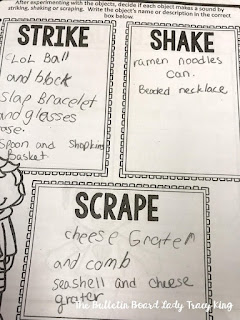
Shakers:  gum or candy containers in their plastic wrapping, cups of ramen noodles, Tic Tacs, a box of paper clips (that I taped closed) and keys on a key chain.
Scrapers: cheese graters, wire cups, beaded necklace, metal jar ring, scrub brush and combs.
Strikers: small lids from deodorant, spray paint, perfume bottles, etc..., tins and small boxes, miscellaneous containers, toys or pieces from toys and cups.
Mallets: pencils, pens, straws, chopsticks, etc...

Learn how to use a found sounds box to engage your students in classifying and describing sounds, composing rhythm pieces and even creating their own new instrument. STEAM in the Music Room at its best.

Over the years, I've used several different kinds of boxes to store my found sound objects.  Right now I'm using a small file folder box.  Plastic shoe boxes are a great size to start with.

Activities

Learn how to use a found sounds box to engage your students in classifying and describing sounds, composing rhythm pieces and even creating their own new instrument. STEAM in the Music Room at its best.

I most often use the Found Sounds Workshop as a workstation.  Students can complete one activity in the time they have at this center.  I have worksheets that ask students to categorize objects by how they make the best sound: strike, shake or scrape.  Other worksheets as them to distinguish between pitch and unpitched, high and low and what material they are made of.  Students love exploring the different objects in the box and often come up with some creative ideas for how to use them.

This activity works well with a variety of grade levels.  With Kindergarten and 1st grade they often drew pictures of the objects than coming up with a name or description for them.  My 4th and 5th graders were able to name (sometimes with great detail) the objects in the box.


After students have had an experience with classifying the objects in the box, the next activity is to create a composition and perform with their found sounds.  I've experimented with this activity and discovered that it saves a great deal of time if I give them a framework that their composition can be created within.  This includes a 16 block grid with room for writing/drawing their "instrument" choice.  With some classes I chose to complete most of the grid for them so that they only have a few choices to make.  This really is just a time saver, as students are able to complete the entire composition themselves.  This ensures that everyone is ready for performance during the same class period.

The composition worksheets and all of the ones I've mentioned above are available for download HERE.

Learn how to use a found sounds box to engage your students in classifying and describing sounds, composing rhythm pieces and even creating their own new instrument. STEAM in the Music Room at its best.

After students have completed the composition and have experience with what works best, it is time to create their own instrument by combining found objects.  I've done this many different ways.  If your school has a dedicated maker space, you may already have all of the raw materials that you will need.  If not you'll want to send out requests to co-workers, parents and possibly some local factories for items your students can use for instrument construction.  I have a large list of items that you can reproduce and send home with your students in the Found Sounds Workshop download in my TpT store.

One way to approach this project is to have students examine the materials that they have available to them and then sketch a design for an instrument.  (I have them use a planning sheet during this part of the project.)  Another way is to have them dream up a great idea, sketch it and make a list of needed supplies.  Next, students find their supplies from your found sounds collections, recycle bins or from their homes.   This way allows students the most creative experience but depending on students to bring in the needed supplies can cause problems.

In a small school district that I worked in, I had students complete their instruments at home and bring them in to class.  This was mostly successful, but it was quite obvious which students did the work and which students' parents did the work.  

If you are interested in using the worksheets that I use, they are available for download HERE.

Found Sounds Workshop by The Bulletin Board Lady-Tracy King Found Sounds Workshop by The Bulletin Board Lady-Tracy King


If you like these ideas, PIN this post for later!

Learn how to use a found sounds box to engage your students in classifying and describing sounds, composing rhythm pieces and even creating their own new instrument. STEAM in the Music Room at its best.


post signature

STEAM in the Music Room: StikBots

STEAM in the Music Room Use StikBots to create easy stop animation videos in your music classroom.  Simple and intuitive to use, your students will be stars in no time!

Scientific and technological innovations continue to become increasingly important in our every day lives. To succeed in our new information-based and highly technological society, students need to develop their capabilities so much more than what was considered acceptable in the past.  As schools around the world focus on STEM initiatives, forward thinkers are looking to the arts to strengthen this focus to STEAM.

As music educators, how to we incorporate the idea of career readiness and technological proficiency in our lessons?  How do we provide problem solving, project based learning activities when we see our students one time a week for 50 minutes?  I must admit that I don't know all of the answers.  I'm about to embark on a STEAM journey and am inviting you to join me.  I'll be sharing some of my ideas for incorporating science, technology, engineering and math into my classroom.

STEAM in the Music Room Use StikBots to create easy stop animation videos in your music classroom.  Simple and intuitive to use, your students will be stars in no time!

I picked up my first set of StikBots at Target months and months ago.  I had a few ideas about what I wanted to do with them and then life happened and they just sat on a shelf looking at me with their half-smiles, waiting for me to pick them up.  When I did, I was delighted with how easy they were to use!

STEAM in the Music Room Use StikBots to create easy stop animation videos in your music classroom.  Simple and intuitive to use, your students will be stars in no time!

The studio pack comes with two StikBots, a simple tripod and a green screen stage.  I sat it up in just a few minutes and downloaded the app for my phone.  I was creating my first stop animation video before I knew it!  If you would rather not just jump in, you might like to watch this Stikbot tutorial I found on YouTube.

STEAM in the Music Room Use StikBots to create easy stop animation videos in your music classroom.  Simple and intuitive to use, your students will be stars in no time!

Although the StikBot figures are an obvious choice for creating your videos, you can actually use anything!  Barbies, figurines, LOL dolls, stuffed animals, action figures are great.  Be creative!  Try salt shakers, rocks, Play Dough blobs, shoes or whatever you want!

For class I chose to use the Stikbots because it eliminated one of the decisions that that students would need to make and it created the same experience for each group. Due to limited time, I had to plan for students to be able to find success in creating a video with as few choices as they could.  With more time, allowing them to choose different characters or even creating their own would be an excellent addition to these lessons. 

STEAM in the Music Room Use StikBots to create easy stop animation videos in your music classroom.  Simple and intuitive to use, your students will be stars in no time!

I had enough sets of the studio packs to divide my students into several groups.  I also had enough old phones with wifi that I could bring in on the days we worked with StikBots.  I've sent out a few requests to friends and family members for old phone donations.  I hope to get enough so that I don't have to bring mine in each time I want to use them.  If your students are allowed to use their own phones at school you may have a student volunteer to use their phone and just message or email their video to you when they are finished.

With minimal instruction, here's a video my 6 year old daughter made in just a few minutes.


When using Stikbots with students, their first experience with them is learning how to use them.  They can create any kind of video with them.  We take enough shots for a 9-15 second video.  This doesn't sound like much, but it takes quite a few photos of slightly different moves to create a video of this length.  I want students to understand how much they need to move the Stikbots and I want them to experiment and make mistakes.  Sometimes the best way to gain understanding is to make many mistakes and keep going!

After students have taken all of the shots they need, they can view their video and discuss things that need improving and things that worked well.  The next project that they do, they can include a background and music.  There are several different backgrounds included and there are also a few music tracks that work well with a variety of scenes.

This video uses one of the Stikbot animal characters and a picture of the elementary school outside my front window.

So, what can students use Stikbots for in music class?  Here are a few ideas:
1.  Demonstration of an original dance they have created.
2.  Demonstration of movement concepts like time, space, flow, shape, levels, pathways and more.
3.  Demonstration of a folk dance or play party game.
4.  Choreography for a song they are working on in class.
5.  Commercial and jingle for a teacher given scenario.  (Create a commercial and jingle to sell product X.)
6.  Music advocacy videos for promoting MIOSM
7.  Composer interviews.  (You can purchase sticker packs for the Stikbots or add your own details to them to create the composer of your choice.)
8.  Tips on performance posture.
9.  Music Theory Hour -discuss an element of music.
10.  Write a parody and create a video for it.  (Try this parody writing kit.)

There are SO many possibilities for using Stikbots in music class.  If you've tried it, I would love to learn how you are using them!

Like these ideas?  PIN THEM for later!

STEAM in the Music Room Use StikBots to create easy stop animation videos in your music classroom.  Simple and intuitive to use, your students will be stars in no time!


post signature